
For iPhone, iPad & Mac · Developer Tools
RLSAND
JSON Editor
A native, universal JSON editor for iPhone, iPad, and Mac. Tree, table, and raw views over one document, search that understands structure, schema validation, structural diff — and an API client where every response opens straight into the editor.
Features
JSON as data, not just text.
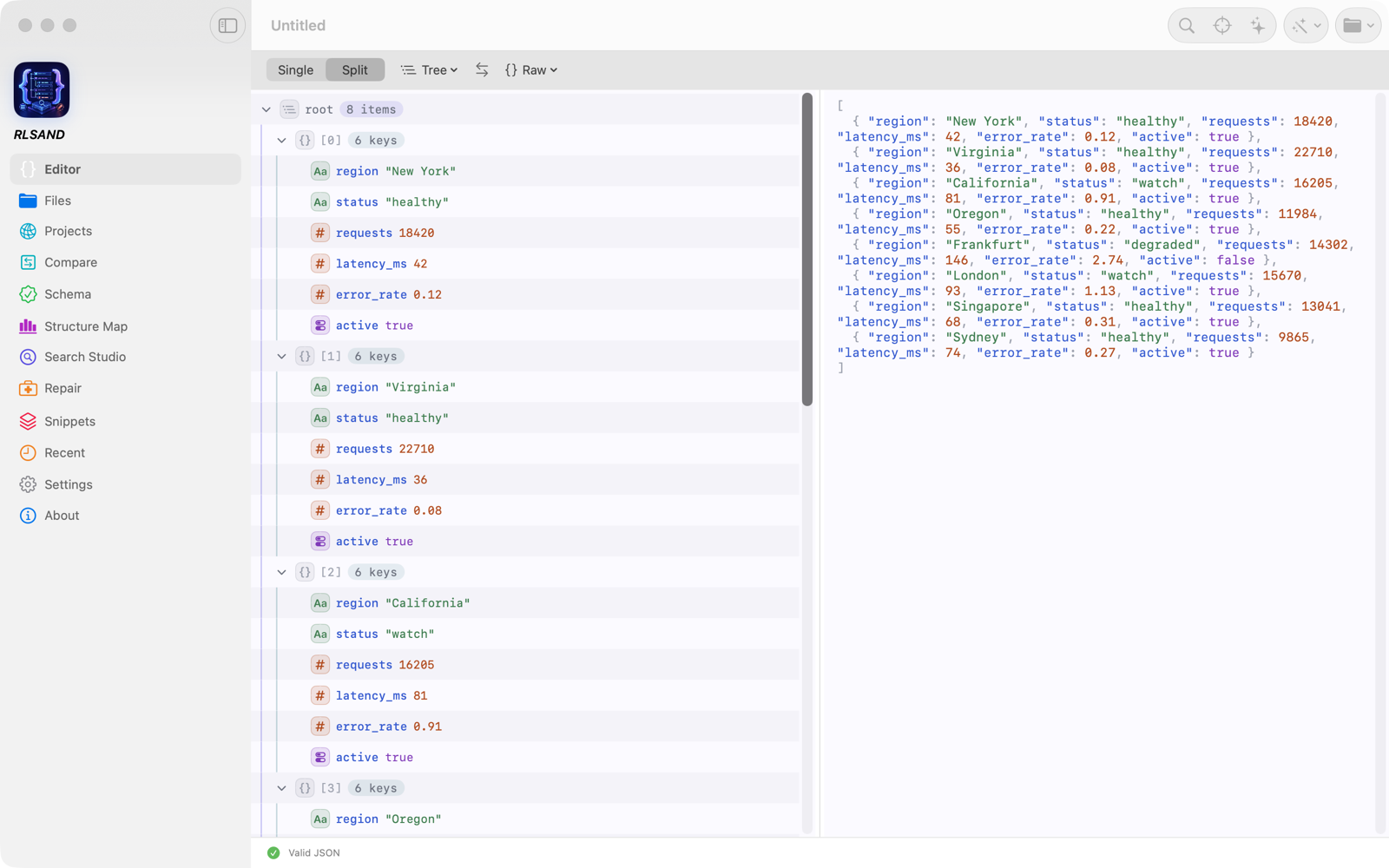
Most JSON tools hand you a text box. This one gives you synchronized views over a single document — edit a cell in the table and the tree, raw text, and CSV all follow. It reads JSON, JSONC, JSON5, and JSON Lines, ships six syntax themes, and is performance-tested to open a 5 MB document in under half a second.
One document, five views
Tree, Table, CSV, Split, and Raw — all synchronized over the same document, with full undo/redo. Edit a value in any view and the others follow. Scalar edits are source-preserving, so your formatting survives.
A table you can edit
Arrays of objects, scalar lists, matrices, and key/value objects are detected automatically and rendered as a real table — typed columns, filters, sorting, statistics, and bulk actions, with CSV copy, paste, and export.
Search Studio
Live search over a cached full-document index. Plain text or regex, scoped to keys, values, or paths; query predicates with dot paths for filtering; JSONPath when you want the power tools. ⌘F works the way you expect.
Repair, don't reject
Malformed JSON or CSV stays visible instead of throwing a wall of errors. The app explains what's wrong in plain language, points at the likely spot, and previews a safe fix before anything is applied.
Validation & Schema
Strict RFC 8259 validation as you type, with inline errors located by line and column. Validate a document against a JSON Schema, or point at a document and infer a schema from it — errors jump to the offending node.
Compare documents
Structural side-by-side diff that understands JSON — added, removed, and changed nodes, not noisy line-by-line text differences. Perfect for eyeballing what actually changed between two API responses.
API Projects
A built-in request client where the response pane is the whole app. Organize requests, use common auth schemes, paste a cURL command, import Swagger / OpenAPI (JSON or YAML) or Postman collections with their variables, from a file or a web address — and open any response straight into the editor, search, compare, or schema tools.
AI help, your way
Version 1.1 adds optional AI help: Ask Your JSON in plain English, AI Assist edits, Explain with AI, and generators for code, sample data and field descriptions. Use Apple Intelligence — on your device, or on Apple's Private Cloud Compute for larger requests on iOS, iPadOS and macOS 27, asking first by default — or your own Anthropic, OpenAI, Gemini or Grok key. Private documents stay on your device, and nothing changes in your document until you choose to apply it.
Private by design
No account, no analytics, no third-party SDKs, no server of ours anywhere in the loop. Documents live in your files on your device. iCloud sync is opt-in, off by default, and stores everything in your own iCloud account.
API Projects
Bring your API in.
Start from the description you already have. Import it from a file, pasted text or a web address, and each operation becomes a request in your project. The Support page lists exactly what comes across.
Swagger / OpenAPI
Swagger 2.0 and OpenAPI 3.0, in JSON or YAML — even from a Swagger UI documentation page. Each operation becomes a request with its base URL and the parameters written on it, and the response schema is saved so you can check replies against it.
Postman collections
Bring in a v2.1 collection with its requests, bodies and variables. Folder names stay in each request's name, and a bearer token set on the whole collection goes straight into your Keychain.
Variables
One variable list per project. Write {{name}} in a request, and {{baseURL}} is your Base URL. Mark keys and tokens Secret to keep them in the Keychain. A collection's variables land here with their values (existing ones keep yours; mark any key or token Secret), and any {{name}} without one is added empty, ready to fill in.
Pricing
One purchase. Every platform.
RLSAND JSON Editor
$9.99
One-time purchase. No subscription.
- Universal Purchase — buy once for iPhone, iPad & Mac
- Every feature included — no tiers, no add-ons
- Tree, Table, CSV, Split & Raw editing views
- Search Studio, JSON Schema & structural Compare
- API Projects client with cURL, Postman & OpenAPI import
- No account, no analytics — your documents stay yours
Why we built it
The JSON editor built the way developers actually work.
JSON is data, but almost every tool treats it as text. We wanted the other thing: a table you can sort and edit when the document is really a spreadsheet, search that knows a key from a value, a diff that understands structure, and an API client that doesn't make you copy responses into a separate editor. Native SwiftUI on every Apple platform — no Electron, no web wrapper — with the Mac app a real Mac app.
It's also our calling card. The same team has spent two decades shipping mobile apps and cloud services for paying client engagements — most under NDA, so there are no logos to show. If you like how this one feels, that's how the ones we'd build for you would feel too.
See what we build for clientsNo account. No analytics. No third-party SDKs. Your documents never touch our servers — we don't have any.
— the privacy policy, in one breath
Ready to tame your JSON?
$9.99, one time — no subscription, and one purchase covers iPhone, iPad, and Mac. Coming soon to the App Store. Questions before then? The Support page has the answers.